Get Paid Faster with Professional Invoices
Create, send, and track professional invoices in minutes. Automate your billing workflow and never miss a payment with our comprehensive invoicing system built for truckers.
No credit card required • 14-day free trial • Cancel anytime
Everything You Need to Get Paid
Professional invoicing tools designed specifically for trucking businesses
Quick Invoice Creation
Create professional invoices in under 2 minutes with our intuitive form. Auto-populate customer details, add line items, and calculate totals automatically.
Email Delivery
Send invoices directly to customers via email with one click. Track when invoices are viewed and follow up on overdue payments automatically.
PDF Export
Download professional PDF invoices with your company logo and branding. Perfect for printing or attaching to emails manually.
Payment Tracking
Track invoice status from draft to paid. See payments due soon, overdue invoices, and total outstanding amounts at a glance.
Revenue Analytics
View total invoiced amounts, paid vs pending, and monthly revenue trends. Make informed decisions with real-time financial insights.
Customer Management
Store customer details for quick invoice creation. View complete billing history and outstanding balances per customer.
Invoice Creation Made Simple
From load completion to payment in just a few clicks
Complete Load
Finish a delivery and mark the load as complete in your dispatching system.
Generate Invoice
Click to create invoice - customer and load details are auto-populated.
Review & Send
Add any additional charges, review totals, and send via email or download PDF.
Get Paid
Track payment status and mark invoices as paid when payment is received.
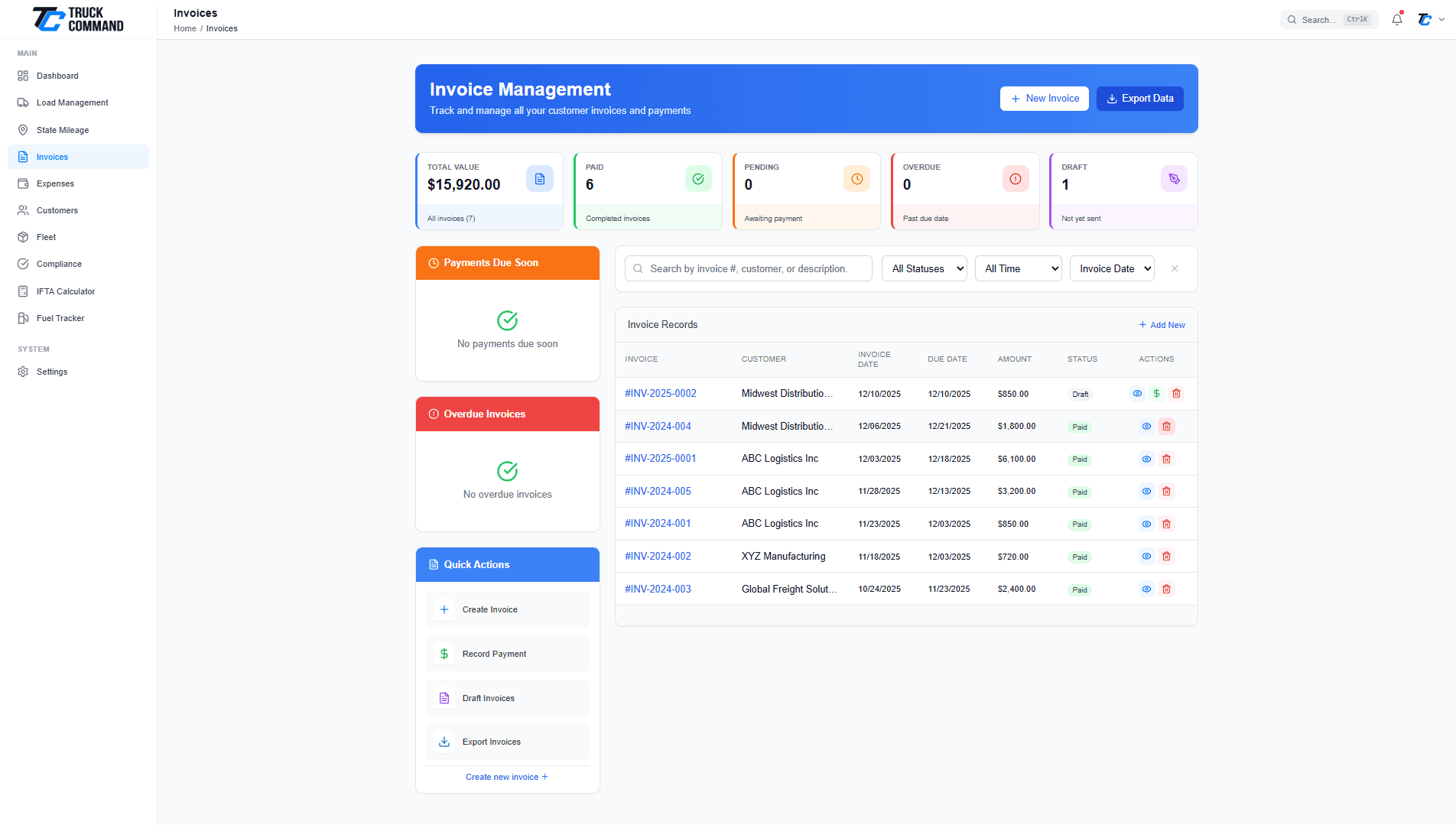
Complete Invoice Management Dashboard
See all your invoices at a glance with powerful filtering and sorting options:
- Status Overview: Track paid, pending, overdue, and draft invoices with color-coded badges
- Quick Stats: Total invoiced, total paid, outstanding amounts displayed prominently
- Smart Filters: Filter by status, date range, customer, or search by invoice number
- Upcoming Payments: Dedicated sidebar showing payments due within 7 days
- Overdue Alerts: Never miss overdue invoices with automatic status updates
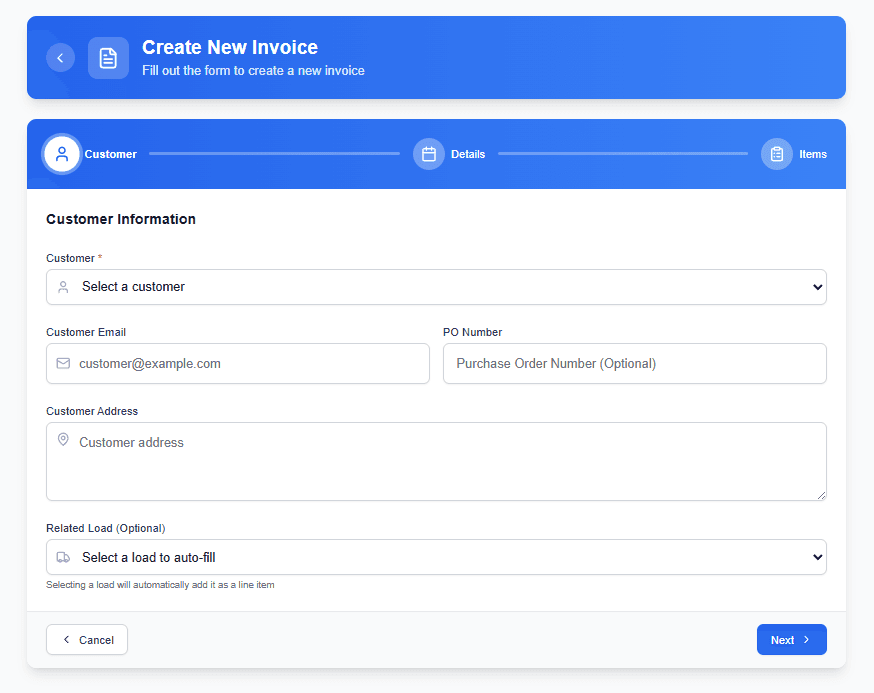
Professional Invoice Creation
Build beautiful, professional invoices with all the details your customers need:
- Auto-Generated Numbers: Sequential invoice numbering with custom prefix support
- Customer Selection: Choose from saved customers or add new ones on the fly
- Line Item Details: Add multiple services, descriptions, quantities, and rates
- Automatic Calculations: Subtotals, taxes, and totals calculated instantly
- Payment Terms: Set due dates and payment terms for each invoice
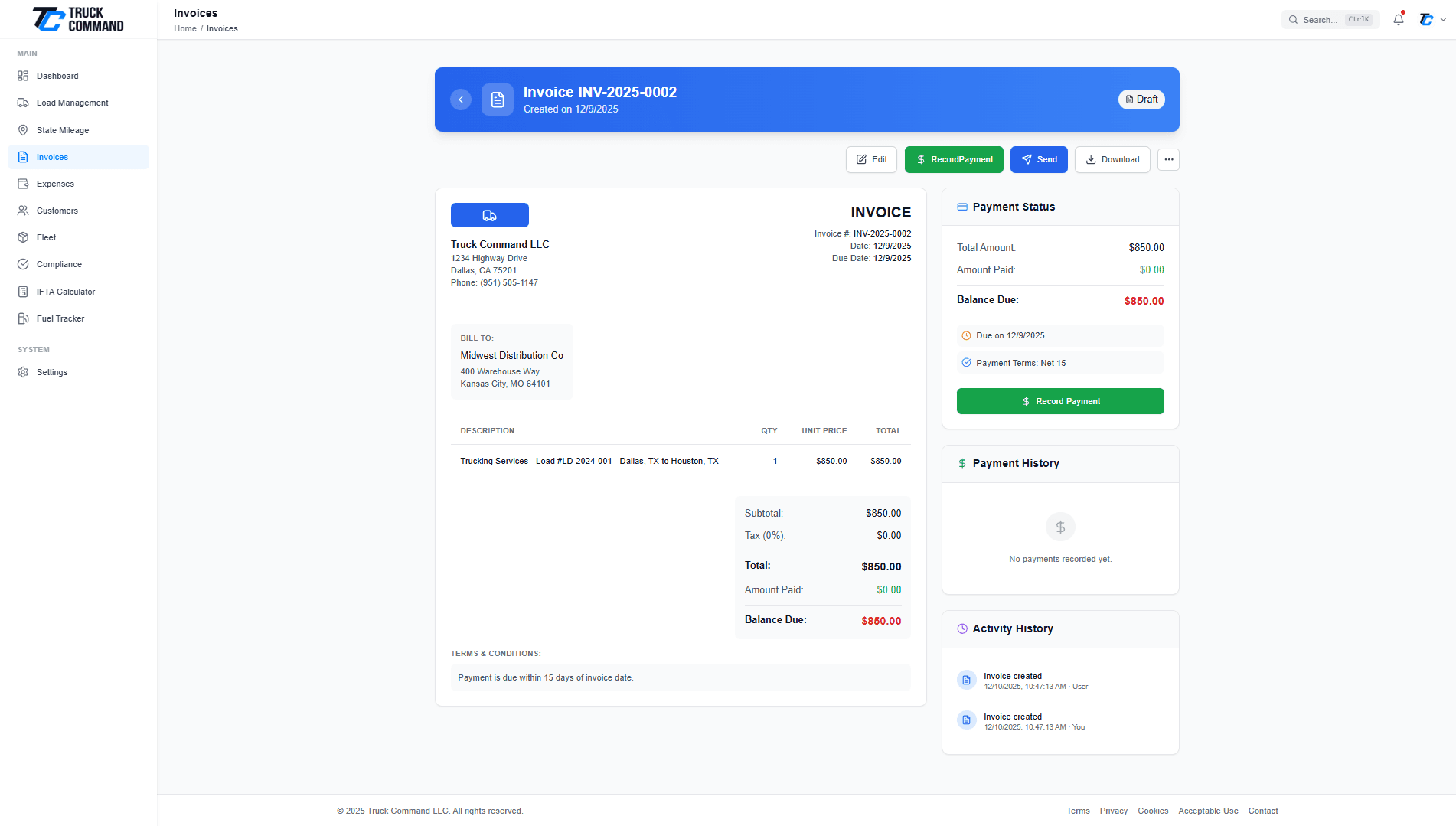
Invoice Detail & Delivery Options
Complete invoice management with multiple delivery and export options:
- PDF Preview: See exactly what your customer will receive before sending
- Email Delivery: Send invoices directly with customizable email messages
- Download PDF: Export professional PDF invoices with your branding
- Edit & Duplicate: Modify existing invoices or duplicate for similar jobs
- Payment Recording: Mark invoices as paid with payment date tracking
Seamlessly Integrated with Your Workflow
Invoicing that connects with every part of your trucking business
Load Integration
Create invoices directly from completed loads. All delivery details, rates, and customer information are automatically populated.
Customer CRM
Customer details sync automatically. View complete billing history, outstanding balances, and payment patterns for each customer.
Financial Reports
Invoice data feeds into your dashboard analytics. Track revenue, accounts receivable aging, and cash flow trends.
Trusted by Trucking Professionals
See how other truckers have improved their billing workflow
“I used to spend hours creating invoices in Excel. Now I can invoice a customer in less than 2 minutes right after completing a delivery.”
Mike Johnson
Owner-Operator, MJ Trucking
“The automatic overdue tracking is a game changer. I never miss following up on late payments anymore, and my cash flow has improved significantly.”
Sarah Davis
Fleet Manager, Davis Freight
“Being able to send professional PDF invoices with my company logo makes my small operation look as professional as the big companies.”
Tom Wilson
Owner-Operator, Wilson Transport
Frequently Asked Questions
Yes! You can upload your company logo and it will appear on all your invoices. Your company name, address, and contact information are also included automatically based on your account settings.
When you mark a load as complete, you'll see an option to 'Create Invoice'. Click this button and the system will auto-populate the invoice with the load details, customer information, and agreed rates. Just review and send!
When you send invoices via email through our system, we track delivery status. You can see when an email was sent and if there were any delivery issues. Future updates will include read receipts.
The system automatically updates invoice status to 'Overdue' when the due date passes. Overdue invoices are highlighted in your dashboard and appear in a dedicated 'Overdue' section so you never miss following up.
Currently, invoices are for billing and record-keeping purposes. You can record payments manually when received. We're working on online payment integration for a future release.
Invoice limits depend on your subscription plan. Basic plans include a monthly limit, while Premium and Fleet plans offer unlimited invoice creation. Check our pricing page for specific limits.
Have more questions about our invoicing features?
Contact Our Support TeamReady to Streamline Your Invoicing?
Join thousands of truckers who have simplified their billing and improved their cash flow with Truck Command.
No credit card required • 14-day free trial • Cancel anytime
Explore Related Features
Discover more ways Truck Command can help your business
Load Management
Track loads from pickup to delivery and create invoices automatically upon completion.
Learn MoreCustomer CRM
Manage customer relationships and view complete billing history in one place.
Learn MoreExpense Tracking
Track all your business expenses alongside revenue for complete financial visibility.
Learn More